Showing posts with label SQL 2008 R2. Show all posts

Wednesday, January 15, 2014

Configure SQL after change computer name

After changing the computer name for a machine that has a SQL installed there is some additional step required:
1- select @@servername 
     > to view the current server name
2- sp_dropserver "Old_Server_Name" 
     > to remove the old server name
3-  sp_addserver "New_Server_Name", local 
      > to add the new server name

Thursday, August 1, 2013

Configure Mirorring on SQL 2008 R2

Principal and Mirror are need to be running same version of SQL Server.
Run ALL SQL Server instances with the same domain account.
Run ALL SQL services with the same domain account.
Ensure that TCP/IP was enabled as a protocol on ALL SQL Server.
Start the SQL Browser Service on ALL SQL Servers.
Ensure that Database on Principle Server is in full recovery model.
On Principal Server Perform a Full backup Transaction Log.
Use the backup file to restore database on Mirror Server with NORECOVERY Option.
Configure Security as below:
1-      Right-click the database, select “Tasks->Mirror…”

2- Click “Configure Security”

3- Click Next

4- Select "Yes" if you need a witness server to configure automatic failover and “No” and Click Next. if this case we will select "No"

5- Click Next

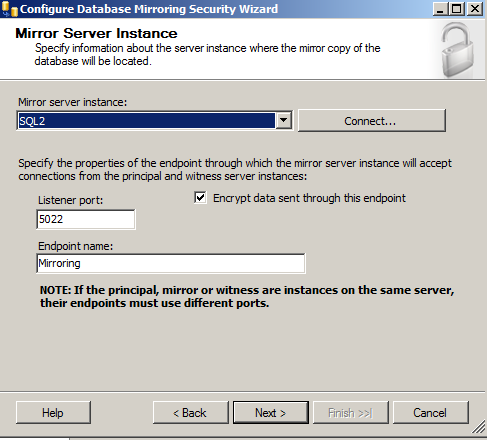
6- Set up the Principal first.

7- Connect to the Mirror Server by the domain account.

8- Type the Service Account that run SQL Instance

9- Click Finish

10- Must see status “Success”

11- Click “Start Mirroring”

Tuesday, July 30, 2013

How to change SQL Collation for SQL Server 2008 R2


How to change SQL Collation for SQL Server 2008 R2

"X:\setup.exe" /QUIET /ACTION=REBUILDDATABASE /INSTANCENAME=MSSQLSERVER /SAPWD=<NewStrongPassword> /SQLCOLLATION=SQL_Latin1_General_Cp1256_CS_AS /SQLSYSADMINACCOUNTS="domain\username"

This command will rebuild the master database and all databases will be de-attached.
databases will not be deleted and you can reattach them after installation done.

X: is the path of the SQL source file